

Most B2B CRM searches end the same way. You open three pricing pages, hit a “Contact sales” button on the second one, and quietly go back to the spreadsheet. The spreadsheet is not really the problem. The decision just feels too big and too expensive to get wrong.
I understand why. A B2B CRM has to link people to companies, hold months of email and call history, and keep follow-ups from slipping, while your team still sells, delivers, and answers email. Most lists on this topic rank enterprise platforms and skip the questions small teams ask first. Will my Excel import survive? Does it sync with Outlook? What happens to my bill when I add users or contacts?
This guide compares 10 B2B CRM options on price, ratings, plan limits, integrations, and setup effort. I call out what each entry plan leaves out, because that is where most surprise costs hide. By the end, you will know which two or three tools deserve a free trial.
What Is a B2B CRM?
A B2B CRM is customer relationship management software built for business-to-business sales. It links several contacts to one company account, tracks deals through longer sales cycles, and logs every email, call, and task.
If you are still deciding whether a small team needs one at all, start with this guide to the best CRM for small business.
How Does a B2B CRM Differ From a B2C CRM?
A B2B CRM manages relationships between companies, with several decision makers, longer sales cycles, and account-level history. A B2C CRM manages individual consumers, with shorter purchase paths and high transaction volume. These features separate a B2B CRM from a simple address book or a consumer tool:
- Company Records: Link multiple contacts, roles, and deals to a single organization.
- Longer Pipelines: Track proposals, approvals, and renewals across weeks or months.
- Shared Activity History: Store emails, calls, notes, and files so any teammate can step in.
- Follow-Up Automation: Trigger reminders and email sequences based on deal stage or inactivity.
What Are the Best B2B CRMs for Sales Pipelines and Contact Management?
Every tool below can store contacts and track deals. The difference is what sits behind each price tier. I note what each entry plan leaves out, so the sticker price does not surprise you later.
| Tool | Best For | Pricing | User Rating (G2) |
| BIGContacts | Easiest All in One CRM for Contact Management, Email Marketing & Deal Tracking | Free for growing teams. Paid plan starts at $9.99/month. | 4.5/5 |
| HubSpot | Free CRM with built-in marketing for sales and marketing alignment | Free plan available; paid plans start at $20/user/month/ | 4.4/5 |
| Zoho CRM | Customizable CRM with a large app ecosystem for budget-conscious teams | Free plan available; paid plans start at $14/user/month (billed annually) | 4.1/5 |
| Pipedrive | Visual pipeline management for sales-led teams | Starts at $14/user/month (billed annually); no free plan | 4.3/5 |
| Salesforce | Deep customization and governance for complex B2B sales | Free Suite available; paid plans start at $25/user/month | 4.4/5 |
| Freshsales | Built-in phone and email for small inside-sales teams | Free plan available; paid plans start at $9/user/month (billed annually) | 4.5/5 |
| Insightly | Turning won deals into managed projects | Starts at $29/user/month (billed annually); no free plan | 4.2/5 |
| Close | Built-in calling, SMS, and email for high-volume outbound teams | Starts at $9/user/month | 4.7/5 |
| monday CRM | Visual boards for teams that also manage projects | Starts at $12/seat/month | 4.6/5 |
| Less Annoying CRM | Flat-price contact and follow-up tracking for very small teams | $15/user/month, one plan | 4.9/5 |
1. BIGContacts – Best for Contact Management, Email Marketing, and Deal Tracking
Open any contact in BIGContacts and the whole relationship sits on one screen: emails, calls, notes, tasks, files, and the company that person belongs to. BIGContacts by ProProfs is the easiest all-in-one CRM for contact management, email marketing, and deal tracking that I use for small B2B teams. It works best when a team wants one shared database instead of spreadsheets, Outlook folders, and a separate email tool.
Setup starts with the import. I upload an Excel, CSV, or Google Contacts file of up to 10,000 records, and the system creates a company record automatically when a contact has a company name. Custom fields hold anything specific to a business, and the sales pipeline lets me define my own stages and switch between Kanban and list views.
Email drip campaigns can move with the deal stage, and the AI Pipeline Tracker flags stalled deals so follow-ups do not go cold. Tasks sync two ways with Outlook, and QuickBooks, Zapier, and Google Calendar connections cover the rest.
This fits small B2B teams of roughly 1 to 25 people that are leaving Excel, Outlook contacts, or a pricier CRM. Roles and permissions let every teammate work from the same records, and the activity timeline shows who contacted whom and when.
Pros:
- Customizable sales pipeline with your own stages in Kanban or list view
- Bulk emails and drip campaigns with open and click tracking
- Imports up to 10,000 records at a time from Excel, CSV, or Google Contacts
- Creates linked company records automatically when a contact includes a company name
- Webforms create a contact record from every website form submission
Cons:
- No downloadable or on-premise version
- Dark user interface option not available
Pricing:
A free plan is available for growing teams. Paid plan starts at $9.99/month.
2. HubSpot – Best for Free CRM With Built-In Marketing
HubSpot’s free CRM was the easiest place to start in this group, and it held more than I expected. The free tier already covers contact and deal management, email tracking, forms, live chat, and basic reporting. For a sales lead who wants to test a real workflow, that is a strong opening.
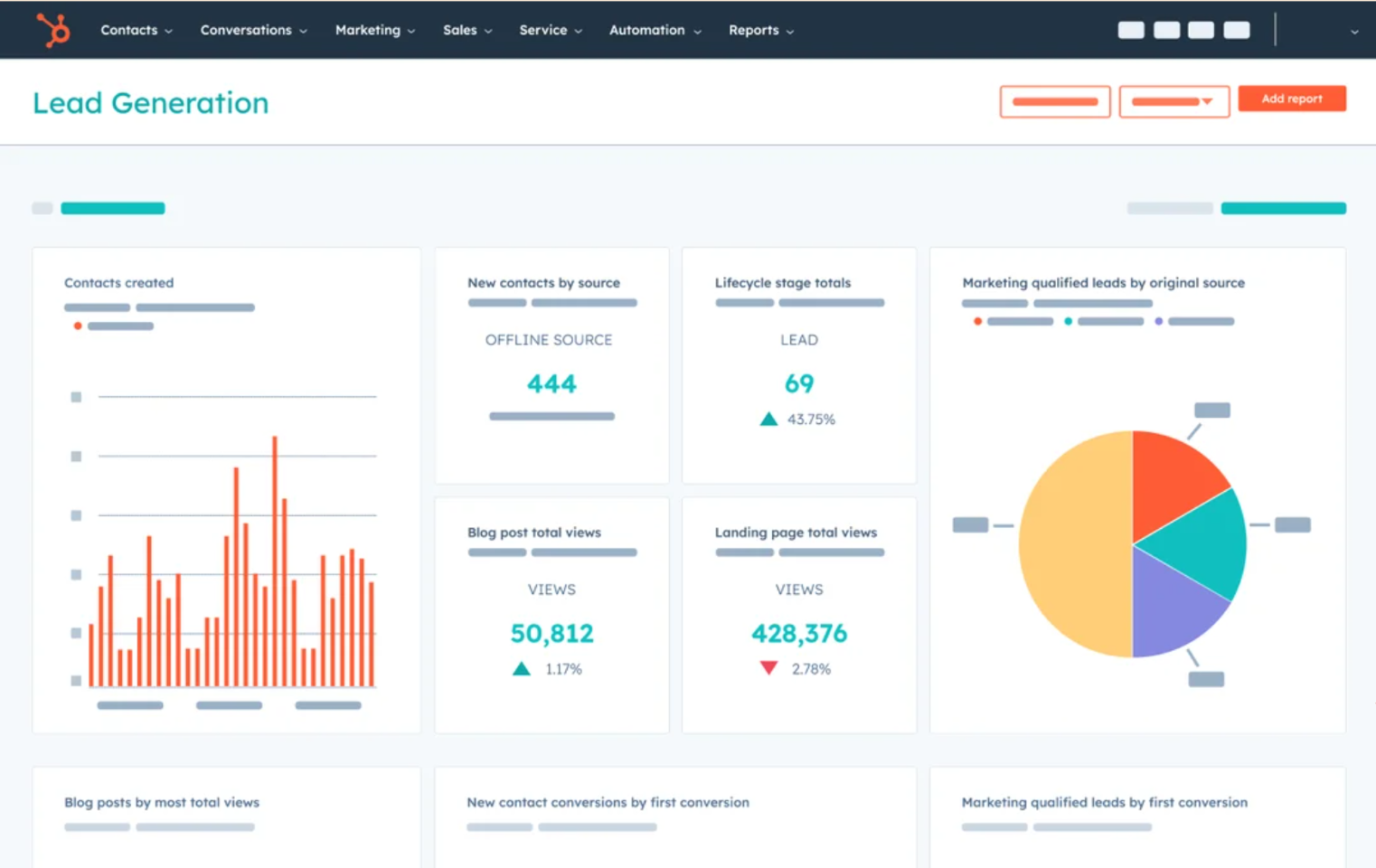
The platform’s real strength is that Sales, Marketing, and Service tools share one customer record. A deal, a form fill, and a support ticket all land on the same contact, which helps when marketing generates a large share of pipeline. Extra deal pipelines and simple automation extend the free tools, while workflow depth, forecasting, and custom reporting arrive in the higher editions. The app marketplace is broad, so most common tools connect without custom work.
HubSpot fits B2B teams that want marketing and sales in one system and expect to grow into more advanced hubs. It fits less well when you want one simple product, because capabilities are spread across several hubs and editions, and mapping them to your needs takes time.
Pros:
- Free tools cover contact management, deal tracking, and email tracking for two users
- Forms, live chat, and chatbots feed leads straight into the CRM
- Starter adds a second deal pipeline and removes HubSpot branding
- Marketing, Sales, and Service tools share the same customer record
Cons:
- Cost rises sharply from Starter to Professional, where sales automation and forecasting live
- Pricing mixes seats, hub tiers, and contact counts, which makes budgeting harder
Pricing:
Starts at $20/user/month.
3. Zoho CRM – Best for Customization on a Tight Budget
Zoho CRM felt like a toolbox with a lot of drawers, and the drawers are the point. Sales automation, web forms, and email tracking come with the standard edition, and a free edition lets a small team try the basics first. For a team that wants control over fields, modules, and process, the depth of customization stands out in this list.
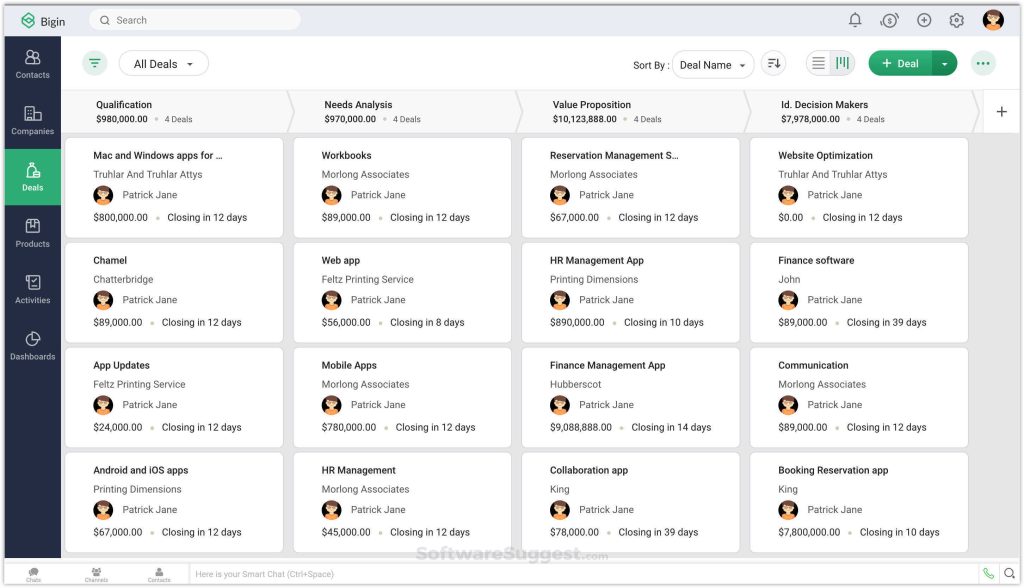
Professional adds Blueprint, a process builder that forces reps through required stages, along with SalesSignals and inventory tools. Enterprise brings Zia, Zoho’s AI assistant, and CommandCenter for journey orchestration. Because Zoho sells dozens of other business apps, teams already on its accounting or marketing tools get tight integration without middleware.
Zoho suits B2B teams with specific process needs and someone willing to configure the system. It suits less well a team that wants to log in and sell on day one. Reviewers often describe the interface as less polished than HubSpot’s, and setup takes more time. Blueprint and Zia sit in the higher editions, so check which edition holds the features you need.
Pros:
- Standard plan includes sales automation, web forms, and email tracking
- Blueprint on Professional enforces a consistent sales process
- Integrates with the wider Zoho app suite without middleware
- Annual billing cuts the Standard price from $20 to $14 per user per month
Cons:
- Interface is less polished than HubSpot or Pipedrive, and setup takes longer
- Zia AI requires the Enterprise plan at $40 per user per month
Pricing:
Free plan available; paid plans start at $14/user/month.
4. Pipedrive – Best for Visual Pipeline Management
Pipedrive opens on the pipeline board, and the whole product is built around that one screen. Deals sit in drag-and-drop columns, each with an owner, a history, and a next activity. For a sales-led team that thinks in stages rather than records, that focus makes the first week of use easy.
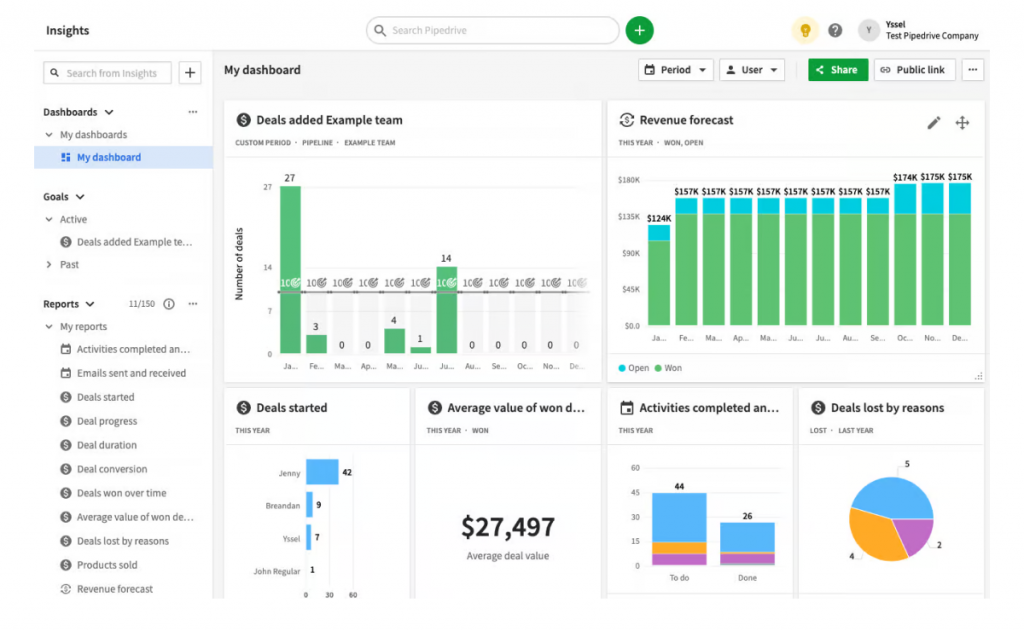
Deal management, contacts, email, and calendar form the core. Workflow automation, email tracking, and templates add depth for active teams, while full-cycle sales tools and 24/7 phone support sit in the higher editions. Web forms, a chatbot, and live chat come as add-ons, so lead capture needs a little extra setup.
Pipedrive suits small B2B sales teams, roughly 1 to 15 reps, that want a clear pipeline and are happy to run marketing elsewhere. It suits less well a team that wants built-in email marketing, because lead capture relies on add-ons. Confirm that your edition includes email sync and automation before you commit.
Pros:
- Drag-and-drop pipeline with customizable stages that suits sales-led teams
- Each deal shows owner, communications, and history in one place
- Growth adds workflow automation, email tracking, and templates
- Premium includes 24/7 phone support and bundles the lead capture add-ons
Cons:
- Lite has no email sync, sequences, or automation
- Web forms, chatbot, and live chat cost extra on Lite and Growth
Pricing:
Starts at $14/user/month.
5. Salesforce – Best for Complex B2B Sales and Deep Customization
Next to the other tools here, Salesforce is less a CRM than a platform you assemble. The entry point is friendlier than it used to be: the Starter Suite covers account, contact, lead, and opportunity management with a customizable sales process. That is enough to start, but it is not where Salesforce earns its reputation.
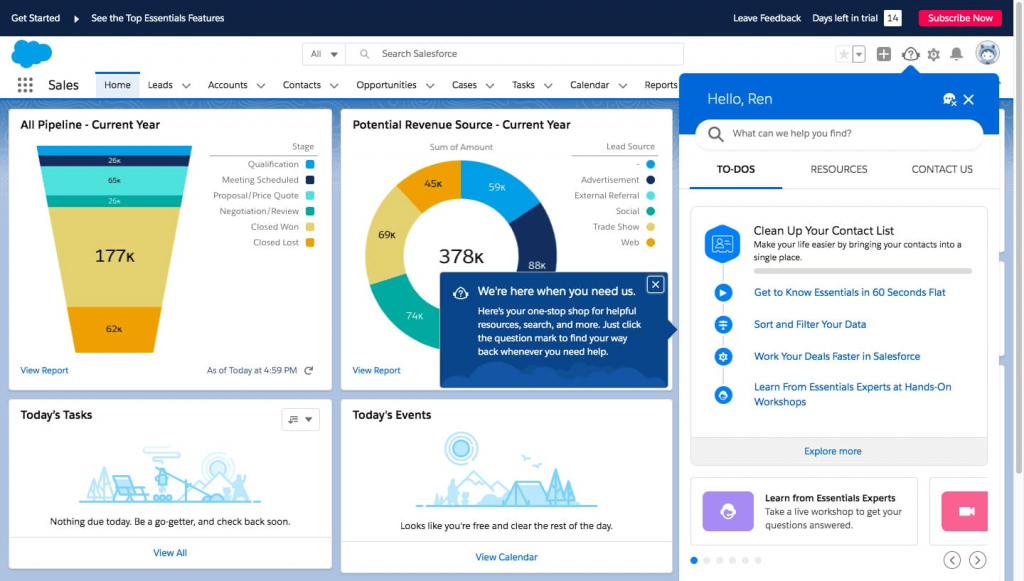
The depth shows up in the Pro Suite, which adds customization, automation, quoting, forecasting, and access to AppExchange. Starter limits are visible, with one custom app and five flows per organization, and email integration with Gmail or Outlook is built in. The Enterprise edition adds the heavier controls that multi-team organizations expect. For teams with approvals, territories, and several sales motions, few tools in this list can follow that process.
Salesforce fits B2B companies with complex sales steps, several teams, or plans to scale well beyond 50 people. It fits less well a five-person team that wants to log in and sell this week, because setup usually needs admin time. Most of the platform’s capability starts at the Pro Suite level, so judge it there.
Pros:
- Starter covers account, contact, lead, and opportunity management with a customizable sales process
- Gmail and Outlook email integration is included
- Pro Suite adds quoting, forecasting, and AppExchange access
- One platform scales from Starter through Enterprise and Unlimited editions
Cons:
- Cost jumps from $25 on Starter to $100 on Pro Suite, where customization and automation live
- Setup and ongoing configuration usually need admin skills
Pricing:
Starts at $25/user/month.
Track Every Deal and Follow-up Without Extra Tools
6. Freshsales – Best for Small Inside-Sales Teams
Making a first call from inside the contact record was the fastest thing to do in Freshsales. The free edition includes a built-in phone, contact and deal management, and weekday support, so a small inside-sales team can start calling and logging in one place. Few entry editions in this list reach that far.
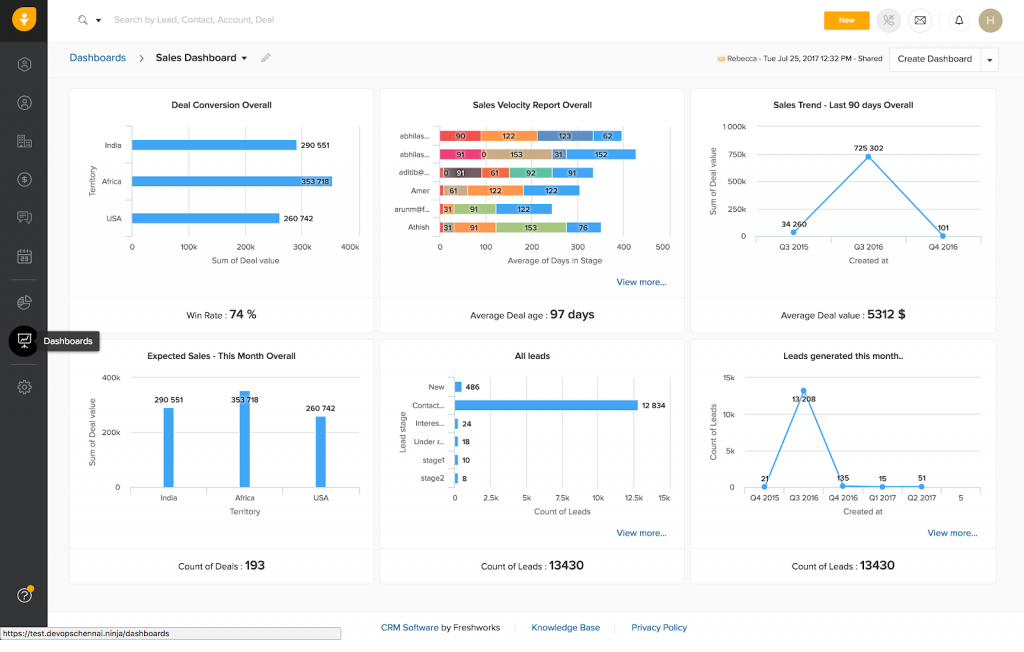
The Growth edition adds web forms, SMS and WhatsApp, basic workflows, and Slack collaboration. Pro adds sales sequences, lead scoring by Freddy AI, auto-assignment rules, multiple pipelines, and duplicate detection. Enterprise adds custom modules, field-level permissions, a sandbox, and a dedicated account manager.
Freshsales fits small B2B teams that live on the phone and inbox and want AI scoring in a lightweight CRM. It fits less well teams that need sequences or multiple pipelines early, since both sit in the Pro edition. Freddy Copilot is a separate add-on, so the AI features need their own evaluation.
Pros:
- Free plan supports up to three users with a built-in phone
- Growth plan includes web forms, SMS, WhatsApp, and basic workflows
- Pro adds sales sequences, lead scoring, and auto-assignment rules
- Enterprise includes a dedicated account manager and sandbox
Cons:
- Sequences, multiple pipelines, and duplicate detection require the $39 Pro plan
- Custom modules and field-level permissions are limited to Enterprise
Pricing:
Starts at $9/user/month.
7. Insightly – Best for Turning Won Deals Into Projects
Insightly asks for a little patience before it pays off, and the payoff is its link between sales and delivery. When an opportunity is won, it converts into a project with the related details copied across, so the sales record and the delivery record stay connected. For a consulting, agency, or services firm, that handoff solves a real problem that most CRMs ignore.
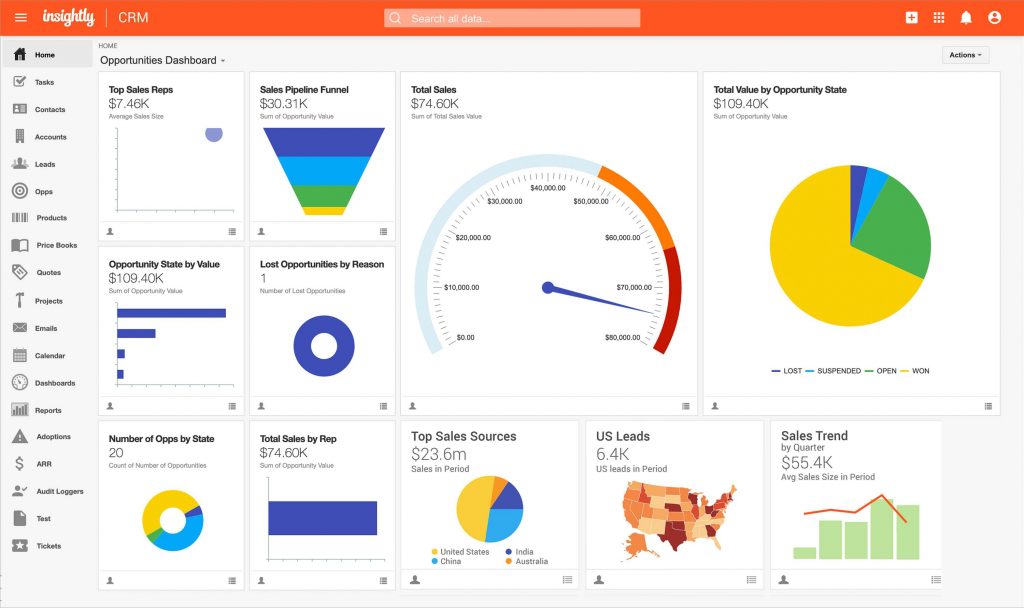
The Plus edition covers Kanban leads, web-to-lead capture, task and event activity sets, and automatic duplicate detection. Professional is where workflow automation, lead assignment and routing, and the AI Copilot start. Enterprise adds custom objects, SAML, audit logging, and sandboxes.
Insightly fits mid-sized B2B teams, roughly 10 to 50 people, that deliver projects after the sale and have someone to own the setup. It fits less well a small team that wants a quick start. Insightly’s own onboarding page puts average CRM implementation at 6 to 8 weeks. The Plus edition also lacks the automation that most buyers expect, so plan on Professional for workflows.
Pros:
- Won opportunities convert into projects with related details copied across
- Plus includes Kanban lead views and web-to-lead capture
- Professional adds workflow automation, lead routing, and the AI Copilot
- Enterprise adds custom objects, SAML, audit logging, and sandboxes
Cons:
- No free plan, only a 14-day trial
- Implementation averages 6 to 8 weeks, and guided onboarding costs $1,500
Pricing:
Starts at $29/user/month.
8. Close – Best for Calling-Heavy Outbound Sales
Close assumes your team spends the day on the phone and in the inbox. Calling, SMS, and email sit inside the CRM from the first plan, so a rep can dial, text, and send a follow-up without leaving the lead record. That single design choice is why outbound-focused teams rate it so highly.
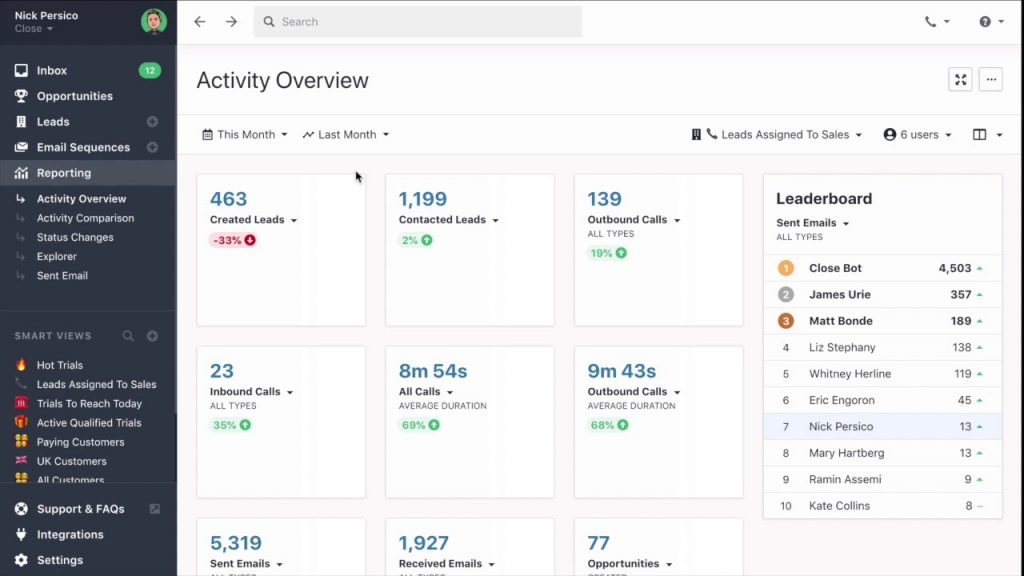
The Solo edition is capped at one user with 10,000 leads. Essentials opens unlimited users and leads, multiple pipelines, and built-in calling and SMS. Growth adds workflows and an AI email assistant, and Scale adds a predictive dialer and advanced permissions.
Close suits B2B inside-sales and cold-outreach teams that measure success in calls and replies. It suits less well teams that want marketing automation. The workflow gap is the main tradeoff: automation starts at the Growth edition, and call recording is an add-on. A team that mostly sends email may not use the calling tools.
Pros:
- Calling, SMS, and email are built in from the entry plan
- Essentials opens unlimited users and leads with multiple pipelines
- Growth adds workflows and an AI email assistant
- Scale adds a predictive dialer and advanced permissions
Cons:
- Solo is capped at one user and cannot grow into a team plan without switching
- Call recording and SMS can add usage-based charges
Pricing:
Starts at $9/user/month.
9. monday CRM – Best for Visual Boards and Combined Project Work
monday CRM looked like a spreadsheet that had learned to behave. Contacts, deals, and tasks live on color-coded boards that anyone who has used monday for projects will recognize in minutes. For a team already running delivery on monday, putting sales on the same platform keeps everyone in one tool.
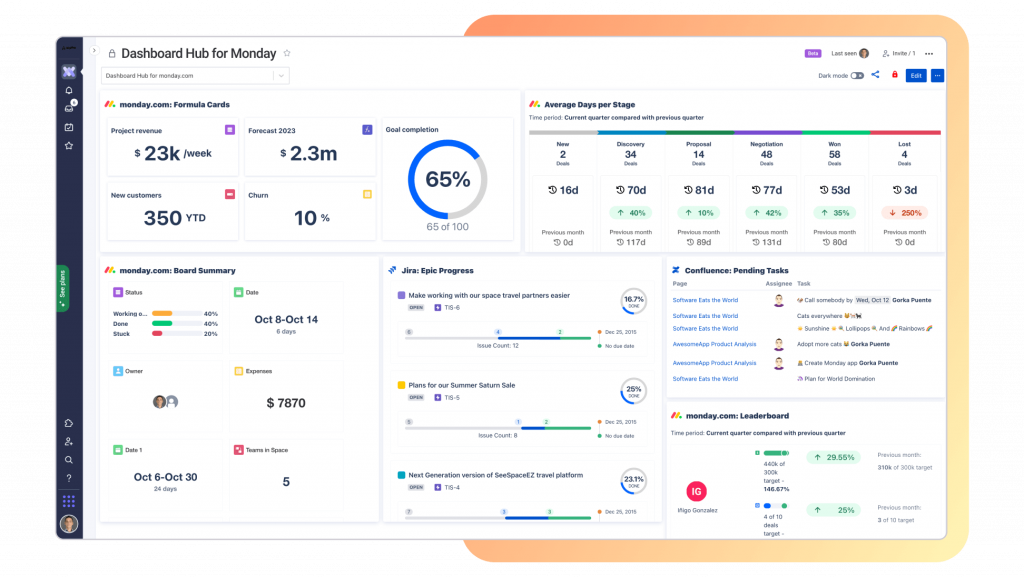
The Basic edition offers unlimited contacts, pipelines, and boards, plus iOS and Android apps. Standard adds two-way email sync, and Pro adds sequences, forecasting, lead scoring, and mass email. Boards can be shared with clients, and project management uses the same underlying platform, so sales and delivery can share data.
monday CRM fits B2B teams that value flexibility and a visual workspace, especially those already on monday. It fits less well a one- or two-person team, because the platform is built for groups of three or more. The Basic edition also lacks email sync, automations, and integrations, so most sales teams should start with Standard or Pro.
Pros:
- Unlimited contacts, pipelines, and boards on every paid plan
- Visual boards that adapt to sales, onboarding, and operations
- Shares a platform with project management for sales-to-delivery handoffs
- iOS and Android apps on all plans
Cons:
- Three-seat minimum on every paid plan
- Basic has no email sync, automations, or integrations
Pricing:
Starts at $12/seat/month.
10. Less Annoying CRM – Best for Flat-Price Simplicity
Less Annoying CRM has one edition, and that is its strongest feature. Every account gets all features, free upgrades, unlimited contacts, companies, pipelines, and custom fields, and 25 GB of storage per user. There are no editions to compare and no feature that appears only after an upgrade.
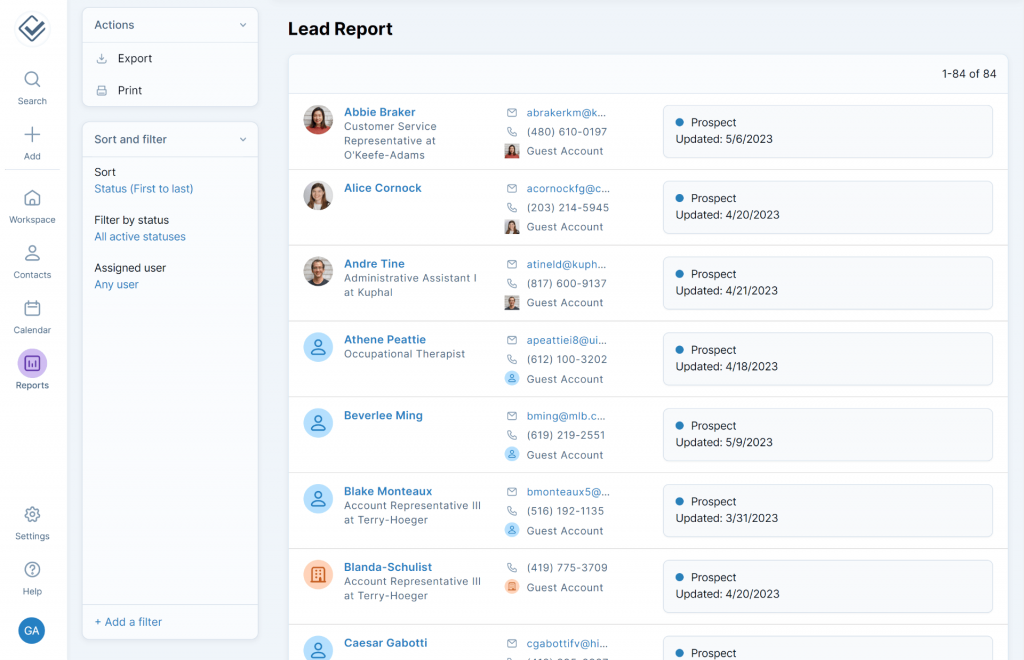
The daily workflow stays small on purpose. Contacts, pipeline, tasks, and calendar sit in one view, with two-way Google and Outlook calendar sync, email logging from up to three accounts per user, and daily agenda emails. Phone and email support is available when setup questions come up.
It fits solo operators and teams under roughly ten people who want something they can run without an admin. It fits less well teams that need built-in email marketing or deep automation, because campaigns run through its Mailchimp integration. The integration list is also shorter than at larger platforms, so check that your essential tools appear on it.
Pros:
- One $15 plan includes every feature and all future updates
- Unlimited contacts, companies, pipelines, and custom fields
- Two-way sync with Google and Outlook calendars
- Phone and email support included at no extra cost
Cons:
- No built-in email marketing, so campaigns run through a Mailchimp integration
- Limited advanced automation compared with larger CRMs
Pricing:
Starts at $15/user/month.
How Did I Evaluate These B2B CRMs?
The evaluation of products or tools chosen for this article follows an unbiased, systematic approach that ensures a fair, insightful, and well-rounded review. This method uses six key factors:
- User Reviews / Ratings: Direct experiences from users, including ratings and feedback from reputable sites like G2, provide a ground-level perspective. This feedback helps identify overall satisfaction and recurring problems.
- Essential Features & Functionality: Evaluate the core features and determine how effectively each tool handles the main use cases associated with the target keyword.
- Ease of Use: Assess the interface, navigation, setup requirements, learning curve, and day-to-day usability for the intended audience.
- Customer Support: Examine support channels, documentation, onboarding resources, response options, and assistance during setup and ongoing use.
- Value for Money: Compare pricing with features, limits, scalability, and practical value to determine whether the product offers reasonable value for its intended users.
- Personal Experience / Experts’ Opinions: Include observations from practical evaluation where available, along with credible expert commentary and recurring user feedback.
My Top 3 Picks for the Best B2B CRM
Each of these three fits a different kind of team, so none of them is the universal winner. Pick the one that matches how you sell and what you want to avoid paying for.
1. BIGContacts
My first pick for small B2B teams moving off Excel, Outlook contacts, or a pricier CRM. It combines contact management, email marketing, and deal tracking in one system, with unlimited users on paid plans and a free plan for one user and up to 100 contacts. Shortlist it if you want a quick start and pricing based on contacts, not headcount. The tradeoff is that it runs only in the cloud.
2. HubSpot
A strong match for teams that want sales and marketing tools connected from day one. The free tools for two users let you test a real workflow at no cost, and the connected hubs share one customer record. Shortlist it if marketing drives your pipeline. The tradeoff is that costs rise sharply once you need Professional-level automation.
3. Pipedrive
The clearest option for sales-led teams of 1 to 15 reps that think in deal stages. Its drag-and-drop pipeline makes progress visible at a glance, and Growth adds email tracking and automation. Shortlist it if a clean pipeline is the priority. The tradeoff is that there is no free plan and lead capture extras cost more on lower tiers.
Turn Your Shortlist Into One Organized Pipeline
Which B2B CRM Works Best for Each Use Case?
The best B2B CRM depends on how your team sells. Small teams leaving spreadsheets need simple import and shared records. Phone-led teams need built-in calling. Complex organizations need process control. Match the tool to the work your team repeats every week.
| Use Case | Best Fit | Why It Fits |
| Leaving Excel or Outlook contacts on a small budget | BIGContacts, Less Annoying CRM | Spreadsheet import, shared records, and simple pricing |
| Free CRM with marketing tools attached | HubSpot | Free tools for two users with forms and live chat |
| Deep customization on a low budget | Zoho CRM | Custom fields and Blueprint starting at $14 per user |
| Visual deal tracking | Pipedrive | Drag-and-drop pipeline stages |
| Complex, multi-team sales | Salesforce | Customization, quoting, and forecasting at higher tiers |
| Small inside-sales team | Freshsales | Built-in phone on the free plan |
| Sales-to-project handoff | Insightly | Won deals convert into projects |
| Calling and SMS outreach | Close | Calling and SMS built into every plan |
| Teams already on monday | monday CRM | Sales and projects share a platform |
What Features Should You Look for in a B2B CRM?
A B2B CRM needs company-level records, a customizable pipeline, two-way email and calendar sync, and spreadsheet import. Follow-up automation, web forms, reporting, and role-based permissions come next. Rank features by the tasks your team repeats weekly, not by the longest checklist.
A study by Capterra in 2026 found that 90% of buyers are more likely to choose sales and marketing software with AI capabilities. AI is now a normal line on the checklist, but it is worth testing on your own data, since many vendors reserve it for higher tiers. For a full breakdown, see this guide to CRM features.
- Company and Contact Records: Link several people, roles, and deals to one account.
- Customizable Pipeline: Define your own stages and view deals in Kanban or list form.
- Email and Calendar Sync: Log messages and meetings automatically, which matters most for Outlook-based teams.
- Spreadsheet Import: Map Excel or CSV columns to fields without breaking formatting.
- Workflow Automation: Trigger tasks, reminders, and email sequences from deal stage or inactivity.
- Web Forms: Turn website enquiries into contact records without retyping.
- Reporting: Show pipeline value, activity, and team performance in ready-made or custom reports.
- Roles and Permissions: Control who can view, edit, or delete records.
Choose the Right B2B CRM to Keep Every Deal and Follow-Up on Track
Picking a B2B CRM comes down to one decision: which system will your team open every day and trust with its contacts, deals, and follow-ups. Every tool in this list can do that for the right buyer, and each one asks for a different tradeoff in price, setup, or depth.
The best choice depends on your use case, team size, budget, integrations, workflow, and how much you expect to grow. Count what sits behind each price tier, test your own spreadsheet import, and confirm the email or calendar sync you need before you commit. Two or three focused trials will tell you more than any feature list.
If you want a simple place to start, BIGContacts is worth exploring as the easiest all-in-one CRM for contact management, email marketing, and deal tracking. The free plan lets you try it with up to 100 contacts, so you can see how it handles your real data before you decide.
Frequently Asked Questions
What Is the Best B2B CRM for a Small Business?
The best B2B CRM for a small business is the one that matches your sales process and budget. BIGContacts, Less Annoying CRM, and Freshsales suit simple setups, while Zoho CRM and Pipedrive add depth. Trial two options with your own contacts before choosing.
Is There a Free B2B CRM?
Yes. BIGContacts offers a free plan for one user and up to 100 contacts, HubSpot's free tools cover two users, and Zoho CRM and Freshsales each support three users. Salesforce also lists a Free Suite. Pipedrive, Insightly, Close, and monday CRM offer trials only.
How Much Does a B2B CRM Cost?
Entry plans in this list run from $9 to $29 per user per month, and automation often costs more. BIGContacts starts at $9.99 per month per 1,000 contacts for unlimited users. Capterra's 2026 buyer research puts the average CRM budget at $78 per user per month.
Which B2B CRM Syncs With Outlook?
BIGContacts syncs tasks two ways with Outlook, Less Annoying CRM syncs calendars with Outlook and Google, and Salesforce integrates Gmail or Outlook email. Each tool covers a different mix of email, contact, and calendar sync, so confirm which one you need before trialing.
Can I Import an Excel Spreadsheet Into a B2B CRM?
Yes. Most B2B CRMs accept Excel or CSV files. BIGContacts imports up to 10,000 records at a time from Excel, CSV, or Google Contacts. Clean duplicates and standardize column headers first so fields map correctly on the first attempt.
What Is the Difference Between Per-User and Per-Contact CRM Pricing?
Per-user pricing charges for each team member, so costs grow with headcount. Per-contact pricing charges by database size, so adding teammates costs nothing extra. BIGContacts uses per-contact pricing with unlimited users, while HubSpot, Pipedrive, and Zoho CRM charge per user.
Do I Need a CRM or Contact Management Software?
A contact manager stores people and notes. A B2B CRM adds company records, pipelines, email automation, and reporting. Choose a CRM when you track deals or follow-ups across several people. This breakdown of CRM versus contact management software explains the difference.
Is My Data Safe in a Cloud B2B CRM?
Cloud CRMs protect data with hosted infrastructure, role-based permissions, and access controls, but protection varies by vendor. BIGContacts hosts on Amazon Web Services. Ask any vendor about encryption, permissions, and GDPR documentation, and read this guide to CRM data security first.
FREE. All Features. FOREVER!
Try our Forever FREE account with all premium features!