

I have sat through enough sales calls where a rep scrolls through three browser tabs, a sticky note, and an inbox search just to answer “where does this deal stand?” That gap between what a sales team knows and what they can actually find is what sales pipeline management software is built to close.
I have spent years testing CRM and pipeline tools for small businesses, and the pattern repeats itself constantly. Teams start with a spreadsheet because it is free and familiar. Then contacts double, follow-ups get missed, and the spreadsheet turns into a liability instead of a system. That is usually the exact moment someone starts searching for sales pipeline management software.
In this guide, I am sharing the 10 tools I would actually recommend, based on hands-on testing, pricing comparisons, and what real sales teams say about each one on review platforms. I will also walk through how these tools work, what to look for, and how to pick the right one for your team size and budget.
What Is Sales Pipeline Management Software?
Sales pipeline management software is a tool that tracks deals through defined stages, from first contact to closed won or closed lost, giving sales teams a visual, real-time view of every opportunity in progress. It replaces manual spreadsheet tracking with automated stage updates and reminders.
A sales pipeline is different from a sales funnel. A pipeline tracks individual deals at the level of one prospect moving through stages. A funnel measures aggregate conversion rates across a group of leads. Pipeline management software focuses on the deal-by-deal view, which is what a rep actually needs when deciding who to call next.
Most sales pipeline management software includes:
- Customizable pipeline stages that match your actual sales process
- Contact and deal records with full communication history
- Automated task reminders for follow-ups
- Email and calendar integration (Outlook, Gmail, Google Calendar)
- Reporting on deal velocity, win rate, and forecasted revenue
- Mobile access for reps working outside the office
Top 10 Sales Pipeline Management Software Tools
I have tested and researched these 10 sales pipeline management software tools based on pricing, ease of use, automation depth, and how well they fit small to mid-size sales teams.
| Tool | Best For | Pricing | User Rating (G2) |
| BIGContacts | Easiest All in One CRM for Contact Management, Email Marketing & Deal Tracking | Forever free for small teams. Paid starts at at $9.99/month | 4.5/5 |
| Pipedrive | Visual, drag-and-drop pipeline tracking | Starts at $14/user/month | 4.3/5 |
| HubSpot CRM | Free all-in-one CRM for startups | Free / Starts at $20/seat/month | 4.4/5 |
| Freshsales | AI-powered deal scoring and forecasting | Starts at $15/user/month | 4.5/5 |
| EngageBay | Budget-friendly 360-degree customer view | Starts at $11.04/user/month | 4.6/5 |
| Keap | Advanced sales and marketing automation | Starts at $199/month | 4.2/5 |
| Zoho CRM | Multichannel pipeline for mid-size teams | Starts at $14/user/month | 4.1/5 |
| Streak | Gmail-based pipeline management | Starts at $15/user/month | 4.5/5 |
| Salesmate | Built-in calling and pipeline automation | Starts at $29/user/month | 4.6/5 |
| Close CRM | Outbound-focused pipeline management | Starts at $49/user/month | 4.7/5 |
1. BIGContacts – Easiest All in One CRM for Contact Management, Email Marketing & Deal Tracking
I use BIGContacts as my go-to recommendation whenever a small business tells me they are drowning in spreadsheets and Outlook folders, because it replaces both without forcing a team through weeks of onboarding. The setup takes an afternoon, not a quarter.
What stands out to me every time I open the dashboard is the Autopilot feature. It triggers automated email sequences based on where a contact sits in the pipeline, so if a deal has been sitting in “Proposal Sent” for five days without a response, a follow-up goes out without anyone remembering to send it. I also rely on the AI-powered dashboard, which surfaces stalled deals across the entire pipeline in one glance instead of making me click into every deal individually.
The part I appreciate most is how BIGContacts keeps contact management, email marketing, pipeline tracking, and task automation under one roof.
Pros:
- Autopilot automation triggers follow-ups based on pipeline stage or time elapsed
- Full 360-degree contact timeline showing emails, notes, calls, tasks, and meetings in one view
- Dynamic and static campaign lists for targeted outreach to segmented contact groups
- Webforms for automatic lead capture from a website directly into the pipeline
- Forever-free plan available for teams just getting started
Cons:
- No downloadable or on-premise version available
- Dark mode is not currently available
Forever free for small teams. Paid starts at $9.99/month.
2. Pipedrive – Best for Visual Drag-And-Drop Pipeline Tracking
I switched to Pipedrive years ago after tracking deals in spreadsheets for too long, and the Kanban-style pipeline view was the first thing that made the whole team stop asking “where is this deal again?” Moving a deal between stages took one click, and that alone cut down on a lot of status-update meetings.
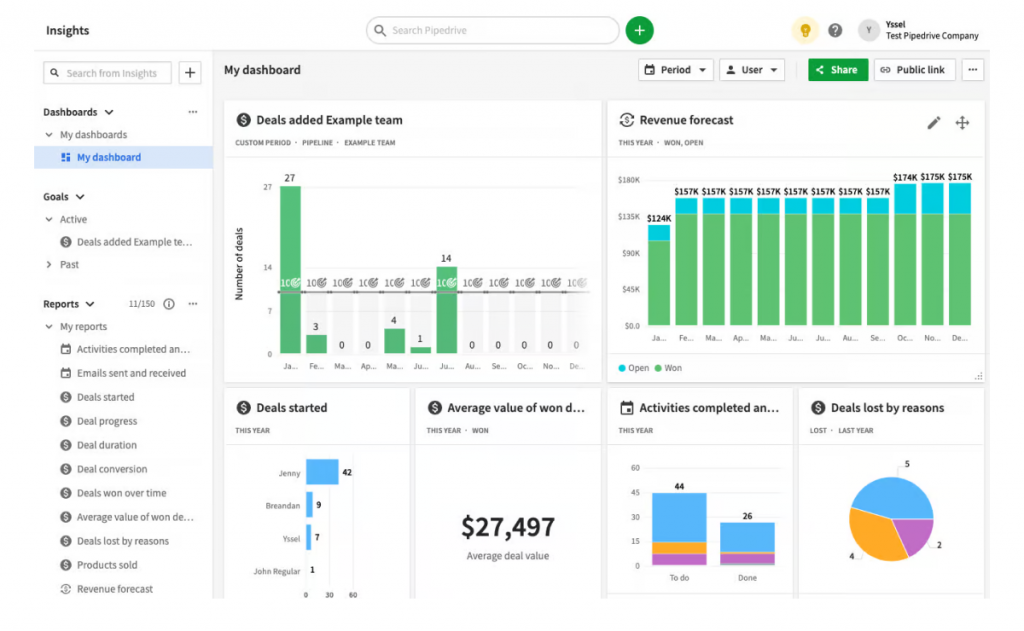
Setting up custom pipeline stages took me about 20 minutes when I first configured it, and from there the AI-powered assistant started flagging which deals needed attention. I found this especially useful for spotting deals that had gone quiet without me having to check manually.
Where I ran into friction was cost. Pipedrive gets expensive fast once you start adding users and unlocking advanced reporting on higher tiers, which is a common complaint I have seen echoed across sales communities and forums. Teams that just need basic contact and pipeline tracking, without the deeper automation layer, may find themselves paying for more than they use.
Pros:
- Intuitive Kanban-style pipeline with drag-and-drop deal management
- AI-powered sales assistant suggesting next-best actions based on deal activity
- 300+ integrations with marketing, accounting, and communication tools
- Highly customizable pipeline stages, fields, and deal cards
Cons:
- Per-user pricing gets expensive for growing teams
- Custom fields and advanced reports are restricted on lower-tier plans
Pricing:
Starts at $14/user/month.
3. HubSpot CRM – Best for a Free All-In-One Startup CRM
A colleague of mine running a B2B startup relied on HubSpot’s free CRM for the first three years of building out a sales team, and I understood the appeal the moment I tested it myself. The free tier includes deal tracking, contact management, and email templates, which covers most of what an early-stage team needs.
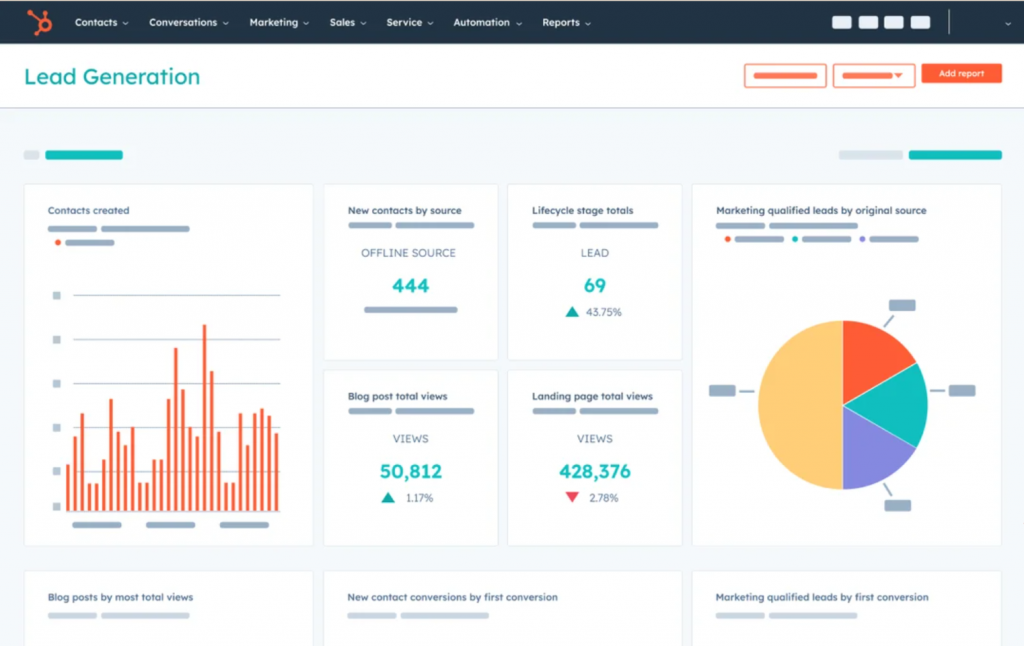
I found the deal pipeline straightforward to navigate, and it connects directly into HubSpot’s marketing and reporting stack if a team eventually needs that. For a small team just getting started with pipeline management, the free plan alone covers a surprising amount of ground.
The catch I ran into is that pricing jumps steeply once a team moves past the free plan and needs sequences, forecasting, or advanced automation. Several sales practitioners in online communities note that HubSpot quickly becomes more than a small team needs, both in complexity and in cost, once the marketing suite gets added in.
Pros:
- Integrates marketing automation, live chat, and sales pipeline in one platform
- Strong reporting dashboards for pipeline health and team activity
- Wide ecosystem of integrations and app marketplace
- Mobile app for pipeline updates on the go
Cons:
- Advanced pipeline features like sequences and forecasting require paid tiers
- Can feel overly complex for teams that only need basic pipeline tracking
Pricing:
Free tier available. Paid plans start at $20/seat/month.
4. Freshsales – Best for AI-Powered Deal Scoring and Forecasting
I spent several months running Freshsales for a mid-size B2B team, and what impressed me most was how cleanly it handled multiple pipelines running side by side. Selling to different segments meant needing separate stages for each, and Freshsales made that simple to configure without duplicate setups.
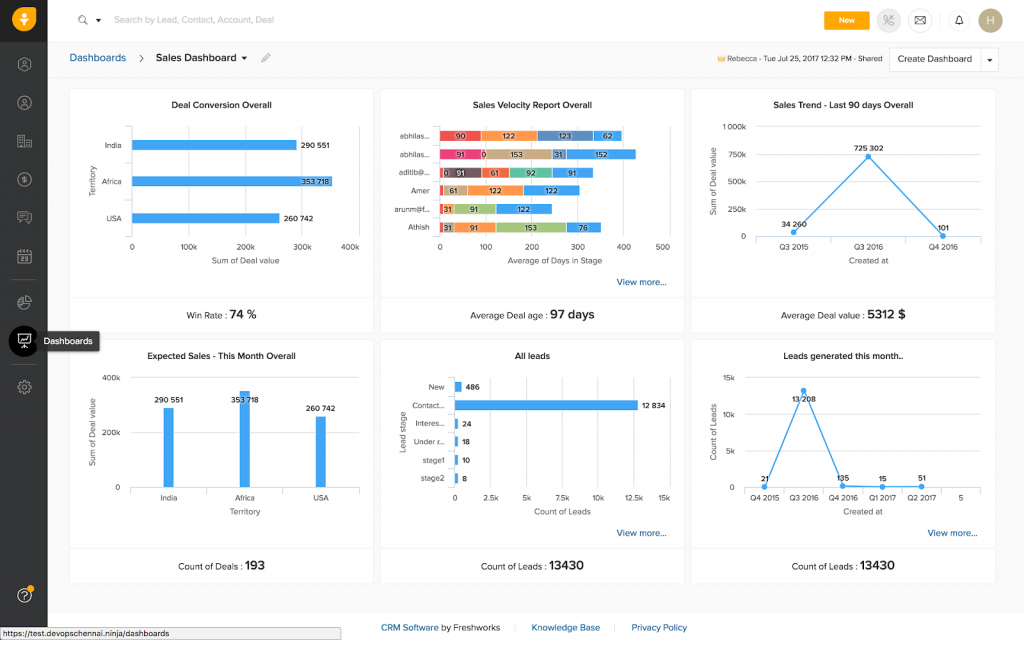
The weighted pipeline feature stood out to me in particular. Assigning probabilities to each stage gave our forecasting dashboard a genuinely usable view of expected monthly revenue, which is something spreadsheets never gave us with any confidence. The AI-powered lead scoring also helped the team prioritize which deals were actually worth chasing that week.
What I noticed as a limitation was that custom modules lacked flexibility for niche workflows, and some of the stronger AI features sat behind higher-tier plans. For teams that need deep customization beyond the standard pipeline stages, this can feel restrictive.
Pros:
- Multiple simultaneous pipelines with fully customizable stages per pipeline
- AI-powered lead scoring to help reps prioritize high-value deals
- Built-in phone and email integration without leaving the CRM
- Smart notifications and activity goals to keep reps on track
Cons:
- Custom modules lack flexibility for niche workflows
- Some advanced AI features are gated to higher-tier plans
Pricing:
Starts at $15/user/month.
5. EngageBay – Best for a Budget-Friendly 360-Degree Customer View
A friend of mine running a small consultancy recommended EngageBay after switching off a much pricier CRM stack, and what stood out immediately was how much it consolidated into one plan without enterprise-level pricing. Sales, marketing, and support all sat in the same system.
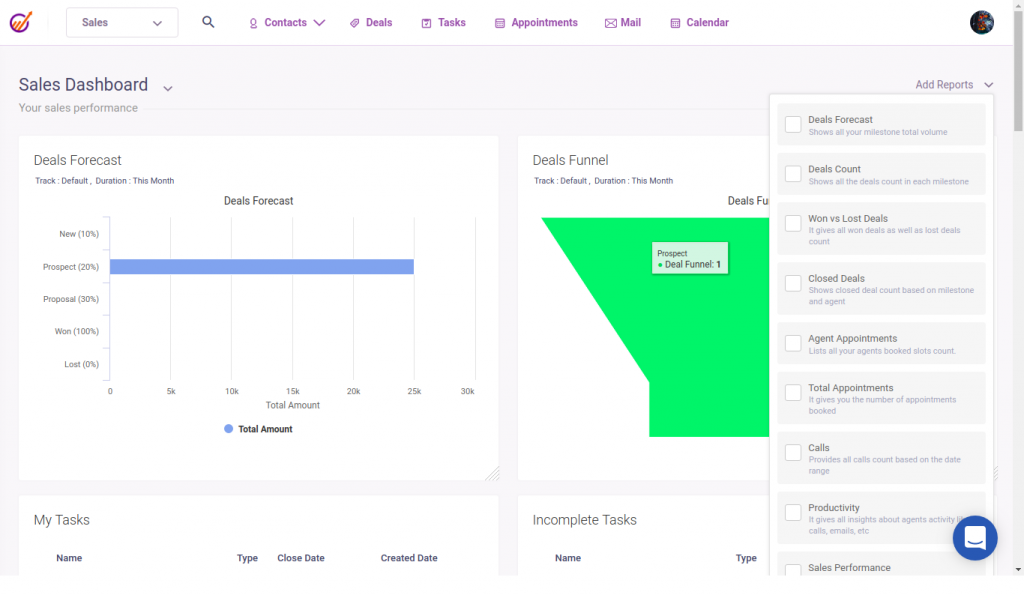
That consolidation matters more than it sounds. When a contact moved through the pipeline, the full history was right there: every email, every live chat conversation, every support ticket. Nobody on the team walked into a follow-up call without context, because the system had already surfaced.
The free plan was generous enough to cover core CRM features, email marketing, and appointment scheduling, which made it a legitimate option among free sales pipeline software for very small teams. Where it fell short was landing page templates and some of the deeper social media analytics, both of which felt thinner compared to dedicated tools built just for those tasks.
Pros:
- Combines CRM, marketing automation, live chat, and helpdesk in a single platform
- Automated lead scoring and customer behavior tracking built in
- Appointment reminders and task alerts reduce missed follow-ups
- Sales pipeline view with drag-and-drop automation per stage
Cons:
- Landing page template options are limited compared to dedicated builders
- Social media analytics and some advanced reporting features are thin
Pricing:
Starts at $11.04/user/month.
6. Keap – Best for Advanced Sales and Marketing Automation
A former colleague who ran a small e-commerce business used Keap for years and consistently credited it with giving her back hours every week. The automation was the reason. When a lead filled out a form, Keap triggered a personalized text, added them to a drip sequence, and scheduled a follow-up task, all without her touching it.
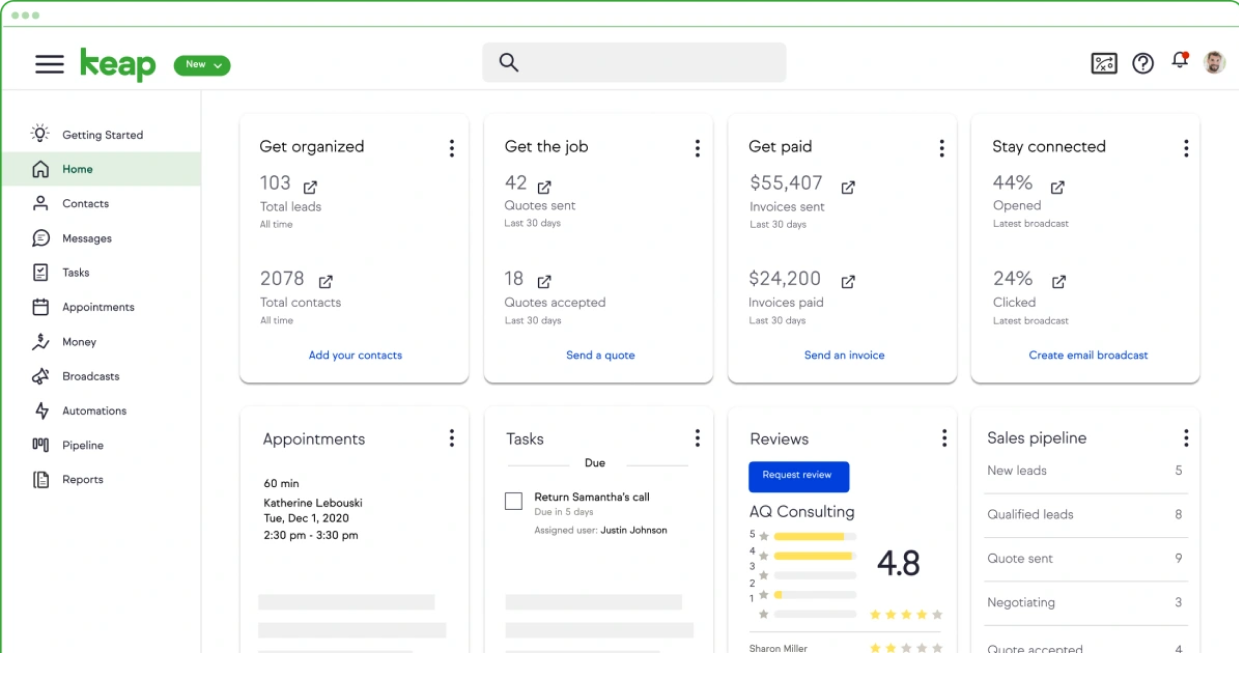
The Zapier integration extended that automation reach even further, connecting to thousands of other apps the business already relied on. For a team that wanted deep personalization at scale without hiring a dedicated ops person, this was one of the more powerful setups I came across in my research.
The tradeoff was cost. Keap sits firmly in the premium tier, and for a small team that just needs basic pipeline visibility and contact organization, it can be more automation than the budget or the workflow actually calls for.
Pros:
- Advanced automation builder handling lead capture to follow-up automatically
- Smart forms capturing detailed lead data, including behavior and buying signals
- Text and email automation templates for fast, personalized outreach
- Lifecycle automation built specifically for small business growth
Cons
- One of the more expensive options on this list for very small teams
- Cancellation requires a verbal request with lead time before billing
Pricing:
Starts at $199/month.
7. Zoho CRM – Best for Multichannel Pipeline Management
A business contact of mine managing a mid-size B2B team across multiple regions switched to Zoho CRM specifically for how well it handled communication across email, phone, social, and live chat inside one pipeline view. That multichannel layer was the deciding factor over tools that only tracked email.
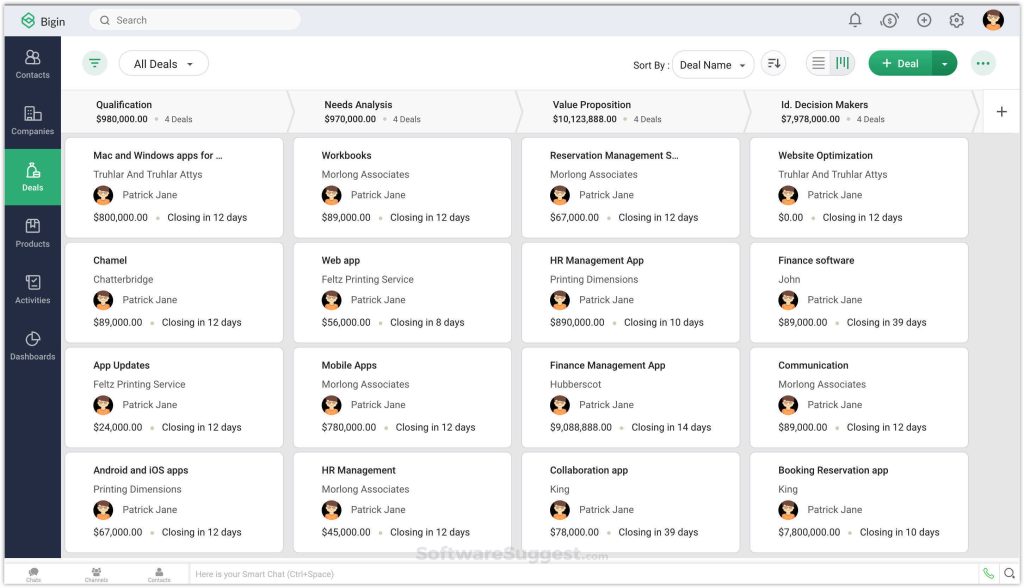
I found the pipeline customization solid once configured, and the reporting suite gave managers real visibility into both individual and team performance without needing a separate BI tool. For teams managing leads across several communication channels at once, this consolidation saves a lot of tab-switching.
Where I ran into friction was the interface itself. It can feel cluttered for a first-time CRM user, and support quality varied noticeably depending on which plan tier we were on at the time.
Pros:
- Multichannel engagement managing email, calls, social, and live chat from one view
- Highly customizable pipelines, fields, and workflows for any sales process
- Strong AI assistant (Zia) for predictions, anomaly detection, and lead scoring
- Excellent integration with the broader Zoho suite (marketing, support, finance)
Cons:
- Interface can feel cluttered and overwhelming for first-time CRM users
- Heavier setup process compared to simpler pipeline tools on this list
Pricing:
Starts at $14/user/month.
8. Streak – Best for Gmail-Based Pipeline Management
A small recruiting firm I consulted with had been searching for a pipeline tool that worked inside Gmail instead of alongside it, and Streak was the first one that actually delivered on that. Once they adopted it, they stopped switching between tools entirely.
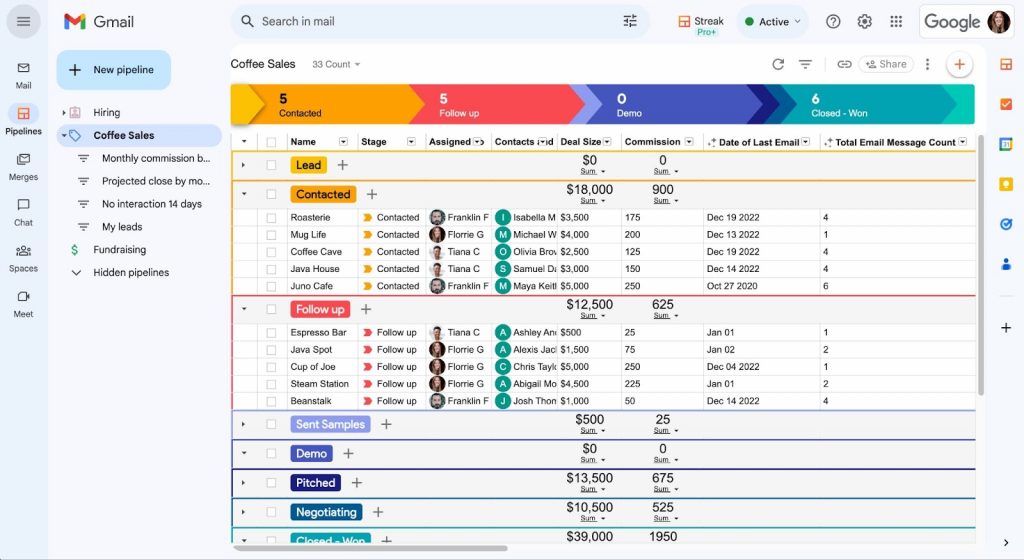
The appeal is simple. If a team lives in Gmail all day, Streak turns the inbox into a full pipeline management tool. Deals got created directly from email threads, contacts linked automatically, and the pipeline view sat right inside Gmail without a separate login. For a small team managing deals primarily through email, this removed an entire layer of context-switching.
The limitation became clear for teams doing heavier phone outreach or needing multiple complex pipelines at once. Streak’s capabilities felt thinner outside of its core Gmail use case, and offline access was more limited than a standalone platform.
Pros:
- Operates entirely within Gmail with no new platform to learn
- Automatic email logging and activity timeline for every deal
- Built-in mail merge and snippets for fast, personalized outreach
- Shared pipeline views for team collaboration inside Gmail
Cons:
- Fully dependent on Gmail, not suitable for Outlook-based teams
- Offline capabilities are limited compared to standalone CRM platforms
Pricing:
Starts at $15/user/month.
9. Salesmate – Best for Built-In Calling and Pipeline Automation
A sales manager I spoke with running an outbound-heavy team recommended Salesmate for one specific reason: calls, emails, and deal updates all happened inside the CRM without ever switching tools. That single detail changed how fast his reps could move through a call list.
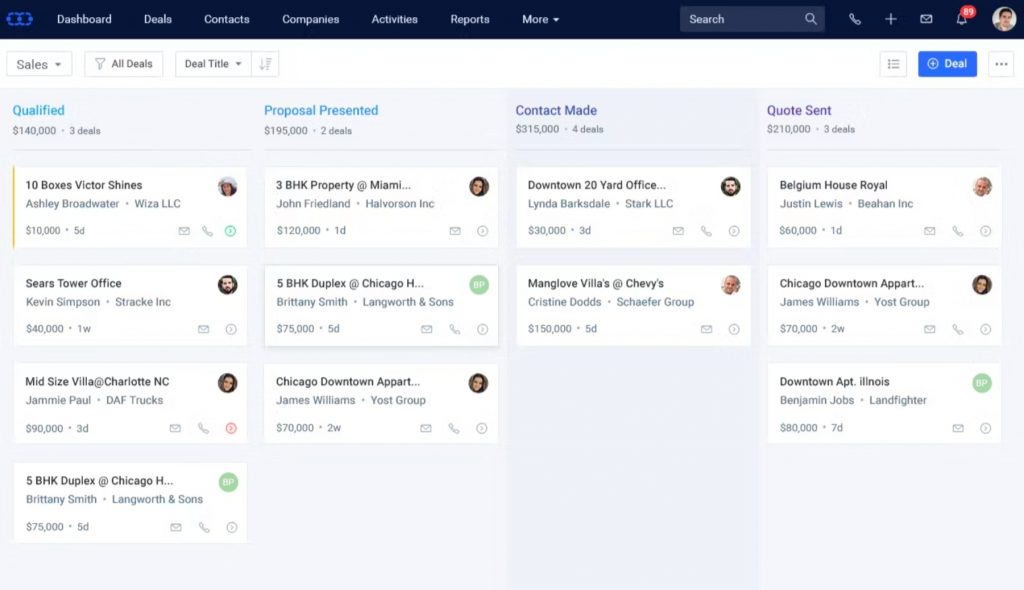
The pipeline itself stayed clean and customizable once we tested it, with support for multiple pipelines and deal card customization by team. The two-way email sync automatically logged outbound and inbound emails to the correct deal, which cut out a meaningful amount of manual data entry across the team.
Cost sat higher than some of the other tools on this list, and the interface felt dense for reps who only needed basic pipeline visibility rather than the full calling and automation suite.
Pros:
- Built-in calling directly within the CRM
- Two-way email sync automatically logs communications to the right deal
- Multiple customizable pipelines for teams selling different products or segments
- Intelligence-driven reporting for deals, emails, and sales activity
Cons
- Higher starting price compared to some competitors on this list
- Built-in calling requires additional setup for international numbers
Pricing:
Starts at $29/user/month.
10. Close CRM – Best for Outbound-Focused Pipeline Management
Outbound-heavy teams I have worked with kept pointing to Close CRM as the tool built specifically for high call-volume selling, and after testing it myself I understood why. The unified inbox combining calls, emails, and SMS into one view was designed for reps constantly reaching out, not occasionally checking in.
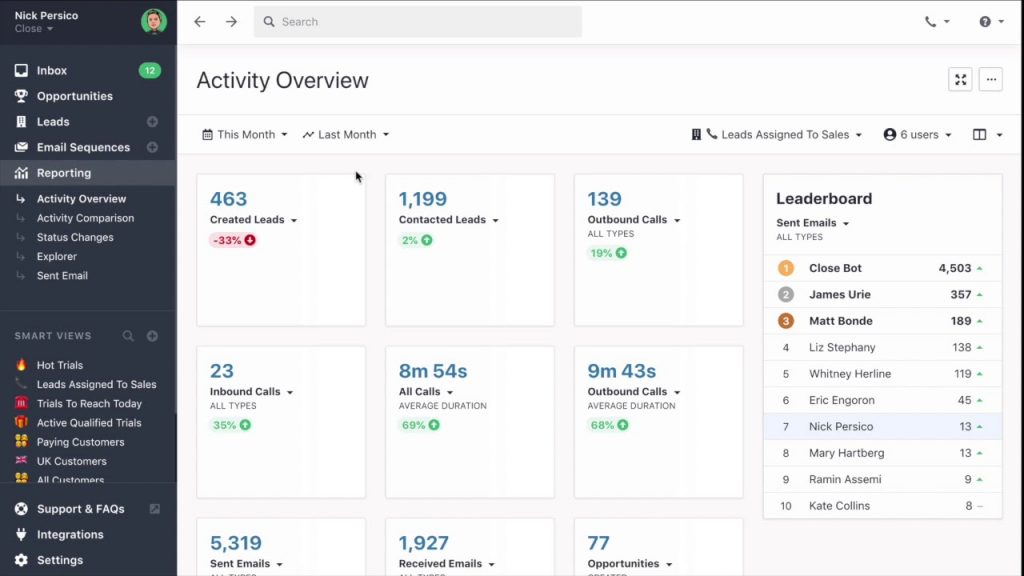
The Smart Views feature stood out the most during testing. It let me build filtered deal lists based on any combination of criteria, so pulling up “leads I have not called in three days” or “deals in proposal stage this month” took seconds instead of manual filtering. For a high-volume outbound team, that kind of targeted visibility is a real productivity gain.
It became clear fairly quickly that Close is less suited to relationship-based, long sales cycles where nurturing matters more than call volume. Teams focused on outbound velocity will get the most value here.
Pros:
- Unified inbox for calls, emails, and SMS in a single pipeline view
- Smart Views for instant filtered deal lists based on custom criteria
- Built-in calling with call recording and transcription
- Predictive dialer available on higher-tier plans for high-volume calling
Cons:
- Better suited to outbound than relationship-based or long-cycle sales
- Less feature-rich for teams needing full marketing automation
Pricing:
Starts at $49/user/month.
How Did I Evaluate These Tools?
I evaluated every tool on this list using six factors that go beyond a feature checklist, because a long feature list means nothing if a small team cannot actually run their pipeline through it day to day.
- User Reviews and Ratings: I pulled direct feedback and star ratings from platforms like G2 and Capterra to understand real-world satisfaction, not just marketing claims.
- Essential Features and Functionality: I looked at core pipeline features like stage customization, automation, and reporting to judge practical usefulness over surface-level polish.
- Ease of Use: I assessed how quickly a new user could set up pipeline stages and start tracking deals without a lengthy onboarding process.
- Customer Support: I factored in how each vendor supports users through setup, troubleshooting, and ongoing account questions.
- Value for Money: I compared pricing tiers against the actual feature set to judge whether a team gets its money’s worth at each price point.
- Personal Experience and Expert Opinions: I combined my own hands-on testing with insights from sales practitioners across forums and review platforms to round out each evaluation.
My Top 3 Picks For Sales Pipeline Management Software
After testing and researching every tool on this list, these three stood out as the ones I would recommend confidently, regardless of where a team is starting from.
1. BIGContacts
BIGContacts is my top pick for growing teams because it balances simplicity and functionality without the complexity tax that comes with bigger platforms. Pipeline management, contact history, email automation, and webforms all work together in one dashboard. If a team is migrating off Excel or Outlook, or just wants a clean system everyone will actually use daily, this is the one to start with, especially given the forever-free plan for teams just getting off the ground.
2. Pipedrive
Pipedrive earns its spot for sales-focused teams that want a visual, deal-centric workflow. The Kanban-style pipeline view gives managers and reps immediate clarity on where every deal stands, and the AI assistant helps prioritize what to work on next. It costs more as a team scales, but the visual clarity is hard to match for teams that live and breathe pipeline stages.
3. HubSpot CRM
HubSpot CRM rounds out the top three because of how much it offers for free. Startups and growing teams get marketing, sales, and contact management under one roof without an upfront investment. As a team scales, the platform grows with it, though it is worth watching costs closely once a team moves into paid, feature-heavy tiers.
How Does Sales Pipeline Software Compare to Spreadsheets?
Sales pipeline management software replaces manual spreadsheet tracking with automated stage updates, reminders, and shared visibility, eliminating the version-control and missed-follow-up problems that spreadsheets create as a team grows past a handful of contacts.
| Factor | Spreadsheet | Sales Pipeline Software |
| Follow-up reminders | Manual, easy to forget | Automated based on pipeline stage |
| Team visibility | One file, version conflicts | Shared, real-time updates |
| Contact history | Scattered across email and notes | Centralized on one contact record |
| Reporting | Manual formulas, error-prone | Automated dashboards and forecasts |
| Mobile access | Limited or none | Native mobile apps |
| Setup cost | Free | Free to $49+/user/month depending on tier |
A study by Nucleus Research in 2024 shows CRM software now returns about $3.10 for every dollar spent, down from an earlier high of $8.71 as the market has matured, but the return stays positive for teams that actually use the system consistently rather than letting it sit half-adopted like an abandoned spreadsheet.
How To Choose The Right Sales Pipeline Management Software?
Choosing the right sales pipeline management software comes down to matching the tool to a team’s actual pain point, size, and existing workflow, rather than picking the platform with the longest feature list. This step-by-step approach to picking a CRM applies just as well when the priority is pipeline tracking specifically.
1. What Pain Point Should Drive the Decision?
Start with the biggest problem: missed follow-ups, poor forecasting, scattered contact data, or a lack of team visibility. That pain point should decide which features get prioritized in a shortlist, not the other way around.
2. How Big Is the Team?
A two-person team rarely needs an enterprise CRM. A 50-person outbound team may have already outgrown a simple contact manager. Right-sizing the tool avoids both underpowered systems and expensive, unused features.
3. What Tools Does the Team Already Use?
A Gmail-based team benefits from something like Streak. An Outlook-heavy team needs strong two-way sync, which is a recurring requirement across small businesses migrating off Outlook’s built-in contact tools. Fighting an existing workflow usually leads to poor adoption regardless of how capable the platform is.
4. Is There a Free Trial or Free Plan to Test First?
Almost every tool on this list offers either a free tier or a trial. Testing with real contacts and real deals, not dummy data, surfaces friction points fast, before a contract is signed.
5. Will the Team Actually Use It Daily?
The best sales pipeline management software is the one a team opens every day without being told to. If it adds friction or feels too complex for the actual sales process, it becomes shelfware within a month, no matter how many features it has.
Start Managing Your Sales Pipeline With Confidence
The right sales pipeline management software does not just organize deals sitting in a list. It creates momentum. When a team knows exactly what to do next, follow-ups happen on time, deals stop going quiet, and a revenue forecast finally means something instead of being a guess dressed up as a number.
The biggest mistake I see teams make is waiting too long to switch off manual tracking. Every week spent managing deals in a spreadsheet is a week where a deal quietly slips through a gap nobody notices until it is too late. Most of the tools on this list offer a free trial or a free tier, which makes testing one a low-risk decision rather than a big commitment.
For teams that are just getting started or tired of paying for features they never touch, a tool like BIGContacts makes it easy to set up pipeline tracking, contact management, and follow-up automation without weeks of training or a big budget behind it.
Frequently Asked Questions
What is the difference between a sales pipeline and a sales funnel?
A sales pipeline tracks individual deals through stages from first contact to close. A sales funnel measures aggregate conversion rates at each stage across a group of leads. Pipeline is deal-level visibility, while funnel is cohort-level analysis.
Is sales pipeline management software the same as a CRM?
Not exactly. A CRM manages the overall relationship with a contact, including history and communications. Pipeline software specifically tracks deals through stages. Most modern platforms, including BIGContacts, combine both in a single system.
Is there free sales pipeline management software available?
Yes. BIGContacts, HubSpot CRM, EngageBay, and Zoho CRM all offer forever-free plans with core pipeline tracking, usually limited by contact count or number of users, which works well for very small teams starting out.
How much does sales pipeline management software cost?
Pricing on this list ranges from free to around $49 per user per month, depending on automation depth, calling features, and team size. Most small business tools fall between $10 and $30 per user per month.
Can small businesses use sales pipeline management software?
Yes, and small businesses are often the best fit. Tools like BIGContacts, Pipedrive, and EngageBay are built specifically for teams without a dedicated RevOps function, with quick setup and no steep learning curve.
Does sales pipeline management software work with Outlook and Gmail?
Most tools on this list integrate with Outlook and Gmail through native sync or Zapier. Streak works exclusively inside Gmail, while BIGContacts and others support two-way sync with both major email platforms.
How long does it take to set up sales pipeline management software?
Lightweight tools like BIGContacts and Pipedrive can be live within a day, including contact import and pipeline stage setup. Larger, enterprise-heavy platforms typically take longer due to customization and data migration.
How many stages should a sales pipeline have?
Most sales pipelines use five to seven stages, such as Prospecting, Qualification, Proposal, Negotiation, and Closed. The right number depends on how complex the sales cycle actually is, not on matching a generic template.
Can I import contacts from excel into sales pipeline management software?
Yes. Every tool on this list supports Excel or CSV import, typically through a mapping tool that matches spreadsheet columns to CRM fields, so existing contact lists do not need to be re-entered manually.
Does sales pipeline management software improve forecast accuracy?
Yes. Stage-based reporting and win-probability tracking replace gut-feel forecasting with data pulled directly from active deals, which is why teams using pipeline software consistently report tighter forecast variance.
Which sales pipeline management software is best for a small team?
For small teams migrating off spreadsheets or Outlook, BIGContacts offers the simplest setup with pipeline tracking, email marketing, and task automation bundled into one forever-free plan, without a steep learning curve.
Is my data safe in sales pipeline management software?
Reputable providers use cloud hosting with encryption, regular backups, and role-based permissions to control who sees what. It is worth checking each vendor's specific security and compliance documentation before migrating sensitive client data.
FREE. All Features. FOREVER!
Try our Forever FREE account with all premium features!